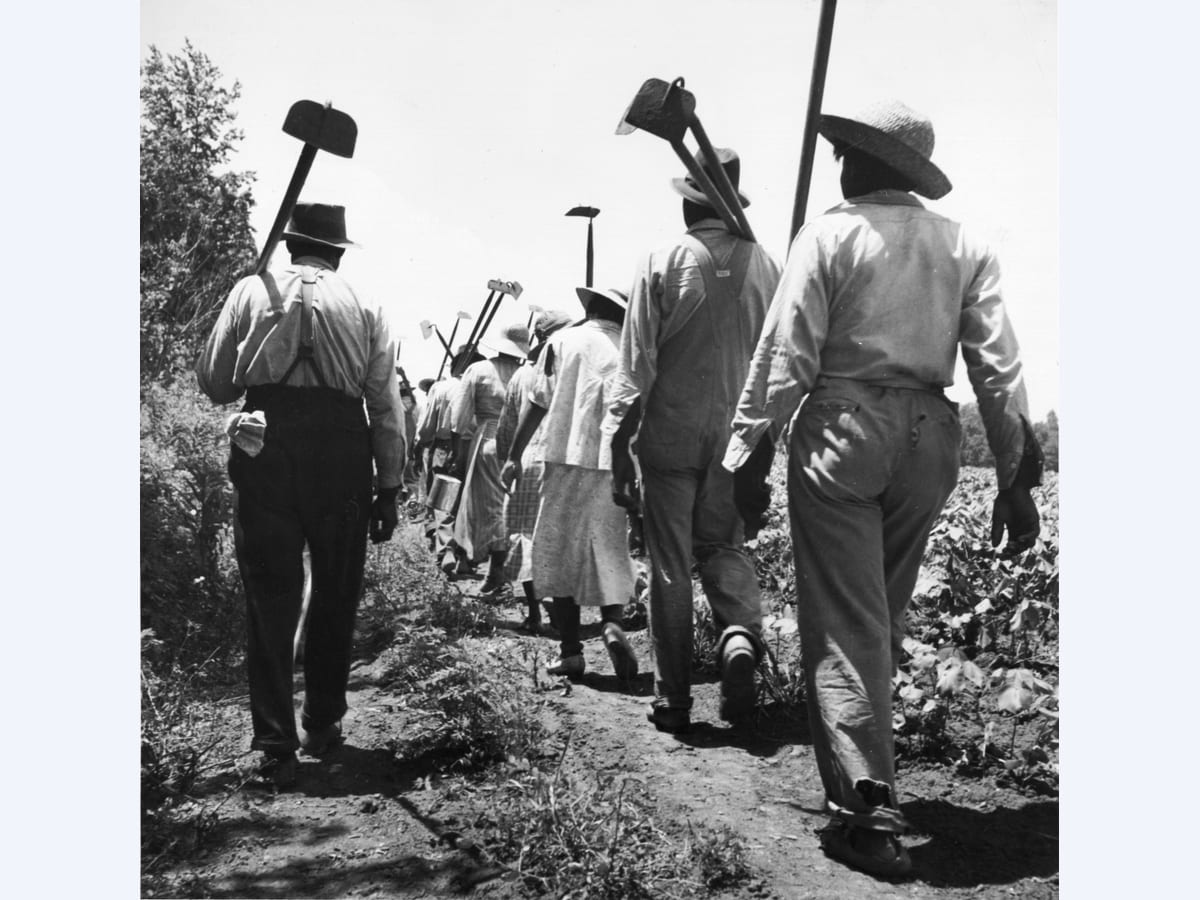
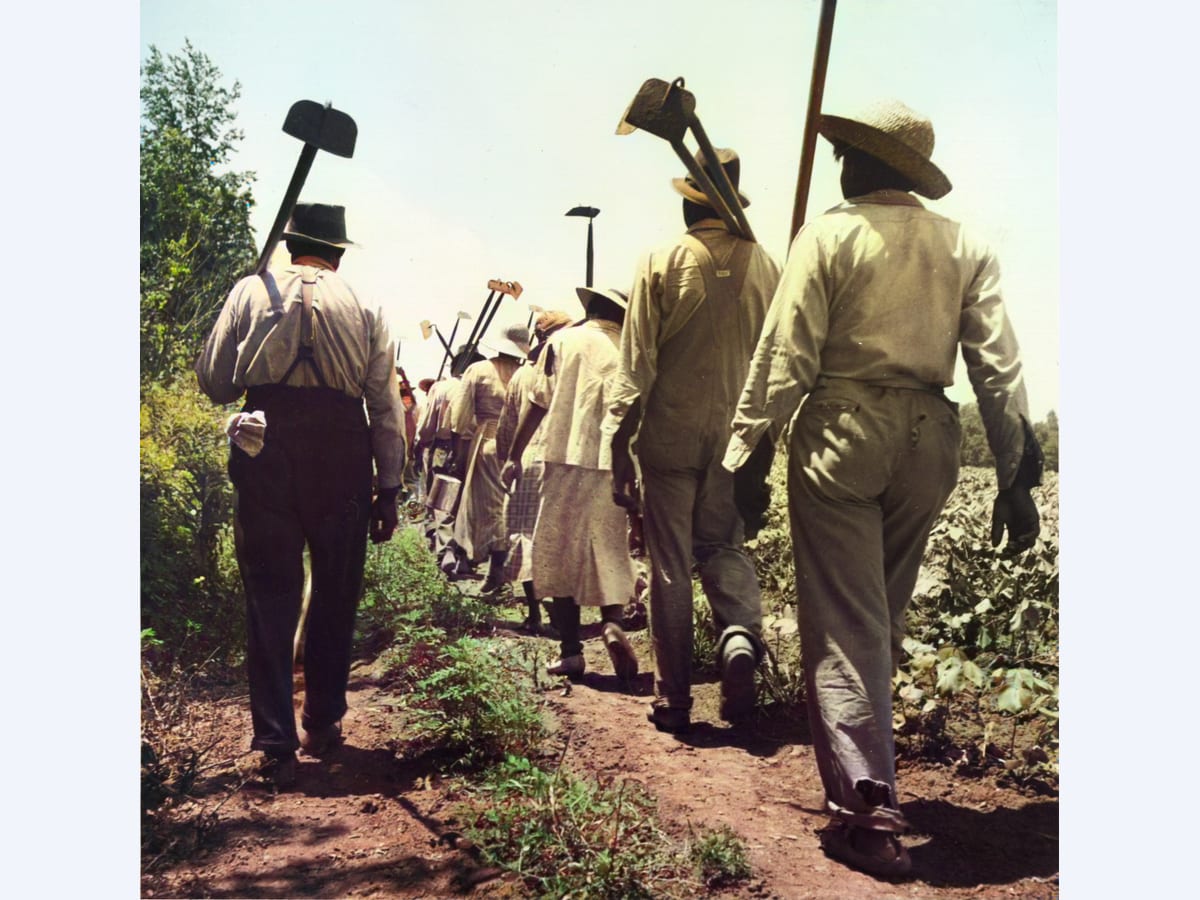
Photo Colorization AI that guesses honestly and shows its work.
A black-and-white photograph does not contain its colors. Colorize infers them from what the scene looks like, which is why it is confident about skin and grass and cautious about a dress nobody alive remembers.
First result free, full resolution·No account needed
BeforeAfter
Quick verification to keep processing fast for everyone.
Best for
For a photograph that is fine, only monochrome.
Use Colorize on a print that is in good condition and simply is not in color. If the photograph is also faded, creased, or marked, Restore repairs the damage and adds color in the same pass.
Family portraits from the black-and-white era
Well-kept prints being prepared for an album or a gift
Archive and documentary photographs shown to a modern audience
Cost and commitment
Your first result is free, full resolution, no account needed.
5 signup credits after account creation.
Uploads are processed for your result and not used for training.
1.Upload the black-and-white scan
2.Choose Colorize
3.Compare the colors against the original at full size
This is the one thing worth understanding before you judge any result. A black-and-white negative recorded brightness and threw the color away. It is not hidden in the file waiting to be extracted. Nothing can read it back, because it was never written.
What a colorization model does instead is recognise what it is looking at and apply the colors those things usually have. It has seen enough photographs to know that skin sits in a narrow band of tones, that foliage is green, that a clear sky grades from pale at the horizon to deeper overhead, and that weathered brick is a particular red. Applied to a face or a landscape, that knowledge is reliable enough to look right.
Applied to anything arbitrary, it is a guess. The model has no way to know that a coat was burgundy rather than navy, and it will pick whichever is more common in photographs like yours. Understanding that boundary is the difference between being pleased with a result and being misled by one.
What it gets right, and where it hedges
Skin is the strongest case, and it is also the one that matters most in a family photograph. Faces come back with plausible warmth rather than the orange cast that older colorization was known for, and the tone stays consistent across a group rather than drifting person to person.
Natural scenes are next: grass, trees, sky, water, wood, stone. These have narrow real-world color ranges, so a good guess and the truth are usually close enough that nobody would know the difference.
Where it hedges, it hedges towards muted. Clothing, painted signage, vehicles, furnishings, anything manufactured and therefore arbitrary — these tend to come back desaturated rather than boldly wrong. That is the right instinct: a gray-brown coat that might have been burgundy is a smaller error than a confidently scarlet one.
The failure worth watching for is a large flat area of unclear material, which can drift towards a color that has no reason to be there. It shows up most on studio backdrops and plain walls.
Judging a result you cannot check
You often have no reference. The people are gone, the room was repainted, and nobody remembers the dress. So the question is not whether the colors are correct, which is usually unanswerable, but whether they are believable and consistent.
Look at faces first, at full size. Skin should read as skin under the light the photograph was taken in, and two people standing together should look like they are in the same room. Then look at the edges of colored regions: color should follow the objects rather than bleeding across a boundary, which is the giveaway of a weak result.
Then decide what the photograph is for. For hanging on a wall or sharing with family, believable is the standard and this clears it. For anything where the color is evidence, it does not, and it should not be presented as though it does.
Scanning matters more here than you would expect
Damage repair can work around a mediocre scan because it is reconstructing shapes it can still see. Colorization is reading fine tonal gradation to decide what a thing is, so a scan that crushes the tones takes away the information it works from.
Scan at 600 dpi or higher and save as PNG or a high-quality JPG. Leave the scanner's automatic contrast and backlight correction off. Those settings push the darks to black and the highlights to white, and a face that has lost its midtones has lost the very gradation the model uses to recognise it as a face.
A flat, slightly dull scan with all its tones intact will colorize better than a punchy one the driver has already 'improved'. If the print has a sepia or yellowed cast, leave it — that is still tonal information, and it is handled.
Where Restore is the better call
The two overlap and the distinction is simple: Colorize adds color and changes nothing else. It will not remove a crease, lift a stain, or repair a torn corner. Run it on a damaged print and you get a color photograph of a damaged print.
So if the photograph has aged as well as being monochrome, use Restore instead. It repairs the damage and adds color in one pass, and it costs more because it does more.
If the print is clean but grainy from the scan, Denoise first, then colorize — grain across a face gives the model less to read. If the result is destined for a print larger than the original, Upscale afterwards, so the enlargement works on a finished image.
Cost, and what comes back
Colorize costs 1 credit per image, the cheapest tool here, because it is a single pass and a light one. That is deliberate: a box of family photographs is a lot of images, and the price should not be the reason you stop after three.
You get a PNG at the resolution you uploaded, with no watermark, and the first result needs no account. Nothing is cropped and no border is added.
Uploads are processed to produce your result and are not used for training. Keep an account if you want the file in your workspace history; otherwise download it and nothing is retained.
FAQ
Common questions
How many credits does colorize use?
Colorize uses 1 credit per image.
Are the colors accurate?
They are plausible rather than accurate. The original color was never recorded, so the model applies what things of that kind usually look like. Skin and natural scenes are reliable; clothing and painted objects are guesses.
Will it repair damage as well?
No. Colorize adds color and changes nothing else. For a print that is creased, stained, or faded, Restore repairs the damage and colorizes in the same pass.
Can I tell it what color something was?
Not at the moment. The model works from the photograph alone, with no way to be told that a coat was green.
Why did a coat come back gray?
Because its color is unrecoverable from the grayscale and the model hedges rather than inventing something bold. A muted guess is a smaller error than a confident wrong one.
Does a sepia or yellowed print work?
Yes. A tint is still tonal information, and it is handled. There is no need to convert to neutral gray first.
How should I scan for the best result?
600 dpi or higher, saved as PNG or high-quality JPG, with the scanner's automatic contrast correction turned off. Crushed midtones remove the gradation the model reads.
What do I get back?
A PNG at the resolution you uploaded, with no watermark. The first result needs no account.
Are my uploads used for training?
No. Uploads are processed to produce your result and are not used for training.